
Members
(static, constant) RobotWare 8 Adaptation Guide
1. Introduction
To comply with the safety requirements of ISO 10218-1:2025, RobotWare 8 introduces a Single Point of Control (SPOC) system. This fundamental change impacts both the user interaction experience and RWS API behavior. This guide provides clear instructions for developers to create or upgrade webapps for RobotWare 8 adaptation.
1.1 Control Station
A control station is an enclosure that contains one or more control devices intended to activate or deactivate functions. The AppStudio framework provides interfaces for control station operations. See API.RWS.CONTROLSTATION.
| Control Station Type | Definition | Examples | Details |
|---|---|---|---|
| Local Control Station | Delivered with the robot system (as part of the robot) | FlexPendant, AppStudio-created webapps running in FlexPendant | Only one local control station can be connected to the controller at a time. Webapps running in FlexPendant share privileges with FlexPendant; no additional registration is required. |
| Remote Control Station | Control devices not delivered with the robot system | RobotStudio, Robot Control Mate, AppStudio-created webapps running in browser | Clients must register as a remote control station before requesting write access. The API.RWS.CONTROLSTATION.requestWriteAccess method handles registration internally. |
1.2 Mastership & Write Access
In RobotWare 7, mastership is needed to perform specific operations. RobotWare 7 defines two types of mastership:
| Mastership Type | Definition | Required Operations | Details |
|---|---|---|---|
| Edit Mastership | Permission to modify controller configuration and program data | Configuration changes, program editing, RAPID module loading/unloading, signal I/O operations | In manual mode, FlexPendant holds edit mastership by default. Remote clients must request Remote Manual Mode Privilege (RMMP) to gain edit mastership in manual mode. In auto mode, mastership can be requested via API.RWS.requestMastership. |
| Motion Mastership | Permission to control robot motion | Starting/stopping programs, jogging robot, motion control commands | Only one client can hold motion mastership at a time. Obtained via API.RWS.requestMastership regardless of the controller's operation mode. |
In RobotWare 8, the mastership concept has been replaced by Write Access in the Single Point of Control (SPOC) system. Write access encompasses both edit and motion permissions, providing unified control over all operations that modify the controller state.
The following table illustrates the recommended write access management methods for different runtime environments:
| WebApp Runtime Environment | Method |
|---|---|
| FlexPendant | Always request and release write access through the FlexPendant UI.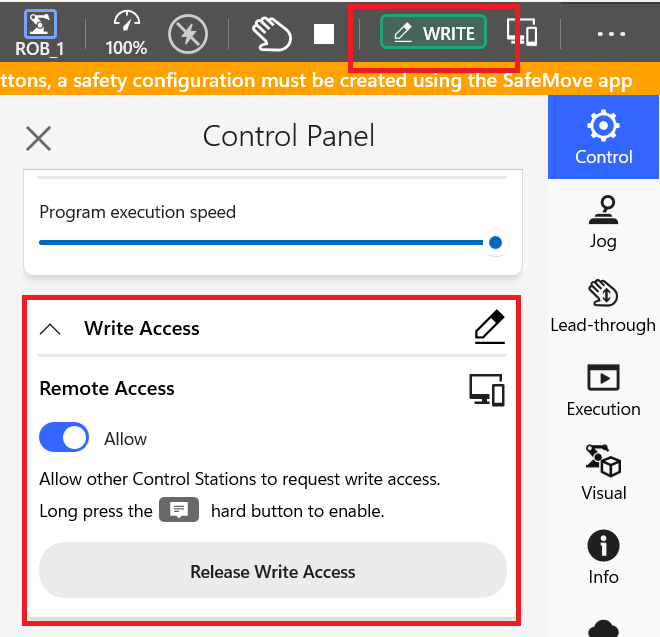 |
| Other Platforms (e.g., Browser) | End users must be informed of the write access status through the webapp UI. Developers should implement appropriate UI components for write access management. Use API.RWS.CONTROLSTATION to manage write access. Prerequisite: External control must be enabled via local control station with write access. |
1.3 Motion Initiation Limitation
In RobotWare 8, the following requirements must be met to initiate robot motion:
- Hardware Requirement: Any control station must be equipped with Emergency Stop and Normal Stop buttons.
- Permission Requirement: Write access must be granted before executing any motion commands.
These requirements ensure compliance with safety standards and maintain the Single Point of Control principle.
1.4 Motor Operation Limitation
RobotWare 7: Motor status can be programmatically managed via API.CONTROLLER.setMotorsState in Auto mode.
RobotWare 8: Motors can only be turned on by performing a Reset operation using physical buttons:
- In Manual Mode: Use the enabling device.
- In Auto Mode: Long press the physical thumb button or use a safety input signal.
The API.CONTROLLER.setMotorsState API is no longer supported in RobotWare 8 for turning motors on.
2. API Impact List
The following sections categorize APIs affected by RobotWare 8's safety requirements. Developers should review these changes to determine if modifications to their webapp business logic are necessary.
2.1 Deprecated APIs
These APIs are deprecated in RobotWare 8 and should not be used. Alternative APIs are provided for replacement.
| API | Description |
|---|---|
| API.CONTROLLER.setMotorsState | The API cannot be used to turn motor on anymore. Error will be thrown if using in RobotWare 8. |
| API.RWS.getMastershipState | Should not be used in RobotWare 8. An error will be thrown. Use API.RWS.CONTROLSTATION.checkIfHeldWriteAccess instead. |
| API.RWS.checkIfHeldMastership | Always returns false in RobotWare 8. Use API.RWS.CONTROLSTATION.checkIfHeldWriteAccess instead. |
| API.RWS.USER.getRMMPState API.RWS.USER.cancelRMMP API.RWS.USER.reqRMMP API.RWS.USER.relRMMP API.RWS.USER.requestRMMP API.RWS.USER.pollRMMPStatus | Deprecated in RobotWare 8 as Remote Manual Mode Privilege (RMMP) has been removed. Use write access management via API.RWS.CONTROLSTATION instead. |
2.2 APIs with New Write Access Requirements
These APIs did not require mastership in RobotWare 7 but now require write access in RobotWare 8.
| API | Description |
|---|---|
| API.CONTROLLER.setOpMode API.CONTROLLER.setOpModeManual API.CONTROLLER.setOpModeAutomatic | RW7: Can switch operation mode without edit mastership. RW8: Requires write access to switch operation mode. An error will be thrown if write access is not held. |
| API.RAPID.startExecution | RW7: Can start program execution without edit mastership. RW8: Requires write access and motion control to start program execution. An error will be thrown if write access is not held or motion control is not allowed. |
2.3 APIs with Mastership to Write Access Changes
These APIs required mastership (edit or motion) in RobotWare 7. In RobotWare 8, mastership has been replaced with write access for these operations.
| API | Description |
|---|---|
| API.CONTROLLER.restart | RW7: Can restart the controller directly; edit mastership is handled internally. RW8: Requires write access. An error will be thrown if write access is not held. |
| API.CONFIG.createSignalInstance API.CONFIG.createSignal API.CONFIG.createCrossConnectionInstance API.CONFIG.updateSignalAttributes API.CONFIG.updateCrossConnectionAttributes API.CONFIG.deleteSignal API.CONFIG.deleteCrossConnection | RW7: Use API.RWS.requestMastership to request edit mastership before calling these APIs. RW8: Requires write access. An error will be thrown if write access is not held. |
| API.MOTION.setTool API.MOTION.setWobj | RW7: Can be used directly; motion mastership is handled internally. RW8: Requires write access. An error will be thrown if write access is not held. |
| API.MOTION.executeJogging API.MOTION.align API.MOTION.goToPosition | RW7: Can be used directly; motion mastership is handled internally. RW8: Requires write access and motion control. An error will be thrown if write access is not held or motion control is not allowed. |
| API.RAPID.setPPToMain API.RAPID.setPPToRoutine API.RAPID.setVariableValue API.RAPID.loadModule API.RAPID.setModuleText API.RAPID.setCycleMode | RW7: Can be used directly; edit mastership is handled internally. RW8: Requires write access. An error will be thrown if write access is not held. |
| API.RWS.RAPID.loadModule API.RWS.RAPID.unloadModule | RW7: Can be used directly; edit mastership is handled internally. RW8: Requires write access. An error will be thrown if write access is not held. |
| API.RWS.RAPID.syncPers | RW7: Use API.RWS.requestMastership to request edit mastership before calling this API. RW8: Requires write access. An error will be thrown if write access is not held. |
| API.RWS.CONTROLLER.setSpeedRatio | RW7: Use API.RWS.requestMastership to request edit mastership before calling this API. RW8: Requires write access. An error will be thrown if write access is not held. |
2.4 RWS APIs Not Wrapped by AppStudio Framework
When using RWS APIs that are not wrapped by the AppStudio framework, developers must verify whether these APIs require write access in RobotWare 8 and handle write access management accordingly.
Common RWS APIs Requiring Write Access:
/rw/rapid/tasks/{task}/program/load- load program/rw/rapid/tasks/{task}/program/unload- unload program/rw/rapid/tasks/{task}/program/name- set program name/rw/rapid/tasks/{task}/build- build task/rw/rapid/tasks/{task}/activate- activate RAPID task/rw/rapid/tasks/{task}/deactivate- deactivate RAPID task/rw/rapid/tasks/{task}/modules/{module}/text/range- modify module text range/rw/rapid/tasks/{task}/modules/{module}/modify-position- modify the first found target in the given extension
Note: This list is not exhaustive. Developers should refer to the RWS documentation to identify all APIs that require write access for their specific use cases.
3. Write Access Management Solutions
3.1 Control Station Namespace
The API.RWS.CONTROLSTATION namespace provides interfaces for write access management in RobotWare 8 SPOC systems.
3.1.1 API.RWS.CONTROLSTATION
3.2 Custom Component Kit for Write Access Management
AppStudio Cloud provides a custom component kit specifically designed for write access management in browser-based webapps. Developers can use this component kit directly or customize their own write access management components by referencing the implementation.
3.2.1 Download and Usage
Download Link: Check AppStudio Cloud Library for downloading.
Display Conditions:
- RobotWare 7: Component does not appear (mastership system does not use write access).
- RobotWare 8 + FlexPendant: Component does not appear (write access managed through FlexPendant UI).
- RobotWare 8 + Browser: Component appears and provides write access management interface.
The component automatically detects the runtime environment and system version, displaying only when appropriate.
Video Demonstrations:
- Download and Integration
- Browser Environment with RobotWare 8
- FlexPendant/TPU Environment with RobotWare 8
3.2.2 Implementation Guide
The custom component kit leverages APIs from API.RWS.CONTROLSTATION namespacee:
1. Monitor Write Access Status
Use API.RWS.CONTROLSTATION.monitorWriteAccessStatus to track write access status changes in real-time:
// Check if running with a SPOC system
const isSpoc = await API.RWS.CONTROLSTATION.isSpocSystem();
// Check if running in browser (not in TPU/FlexPendant)
const isInBrowser = !API.isTPU();
// If conditions are not met, destroy the component
if (!isSpoc || !isInBrowser) {
    ccInstance.destroy();
    return;
}

// Monitor write access status
setTimeout(async () => {
    await API.RWS.CONTROLSTATION.monitorWriteAccessStatus(async (status)=>{
        let isHeld = false
        let isHeldByOther = false;
        try {
            let response = await API.RWS.CONTROLSTATION.checkIfHeldWriteAccess();
            isHeld = true;
        } catch (e){
            isHeld = false;
            if(e.message && e.message=='WriteAccessHeldByOtherClient'){
                isHeldByOther = true;
            }
        }
        // update component UI based on the status
        if(isHeld){
            ccInstance.child.Text_2.text = TComponents.Component_A.t(
                "WriteAccess.ButtonWithBar:writeAccessHeld",
            );
            ccInstance.child.Button_3.icon = "abb-icon abb-icon-abb_information-circle-1_16";
            ccInstance.child.Button_3.color = "#0051FF";
            ccInstance.child.Button_5.text = TComponents.Component_A.t("WriteAccess.ButtonWithBar:releaseWriteAccess");
            ccInstance.child.Text_4.backgroundColor ="rgba(0, 81, 255, 0.08)";
            ccInstance.child.Button_5.show();
        } else{
            if (isHeldByOther) {
                ccInstance.child.Text_2.text = TComponents.Component_A.t("WriteAccess.ButtonWithBar:readOnlyStatus1");
                ccInstance.child.Button_5.hide();
            } else {
                ccInstance.child.Text_2.text = TComponents.Component_A.t("WriteAccess.ButtonWithBar:readOnlyStatus2",);
                ccInstance.child.Button_5.show();
            }
            ccInstance.child.Button_3.icon = "abb-icon abb-icon-abb_warning-triangle_321";
            ccInstance.child.Button_3.color = "#FFA200";
            ccInstance.child.Button_5.text = TComponents.Component_A.t("WriteAccess.ButtonWithBar:requestWriteAccess");
            ccInstance.child.Text_4.backgroundColor ="rgba(255, 162, 0, 0.08)";
        }

    })
}, 0);
2. Request Write Access
Use API.RWS.CONTROLSTATION.requestWriteAccess and API.RWS.CONTROLSTATION.releaseWriteAccess to manage write access:
// put the code in the 'onClick' event of the UI component
try {
  // Check current write access status
  let isHeld = false;
  let isRemoteAccess = false;
  try {
    await API.RWS.CONTROLSTATION.checkIfHeldWriteAccess();
    isHeld = true;
    isRemoteAccess = true;
  } catch (e) {
    isHeld = false;
    if (e.message && e.message == "ExternalControlNotEnabled") {
      isRemoteAccess = false;
    } else {
      isRemoteAccess = true;
    }
  }
  if (!isRemoteAccess) {
    TComponents.Popup_A.danger(
      TComponents.Component_A.t(
        "WriteAccess.Component1:writeAccessNotAvailable",
      ),
      [
        TComponents.Component_A.t(
          "WriteAccess.Component1:writeAccessNotAvailableReason",
        ),
        "",
        TComponents.Component_A.t(
          "WriteAccess.Component1:enableExternalControlNotify1",
        ),
        TComponents.Component_A.t(
          "WriteAccess.Component1:enableExternalControlNotify2",
        ),
        TComponents.Component_A.t(
          "WriteAccess.Component1:enableExternalControlNotify3",
        ),
      ],
    );
  } else {
    if (isHeld) {
      // Write access is currently held - show release confirmation dialog
      await TComponents.Popup_A.asyncConfirm(
        TComponents.Component_A.t("WriteAccess.Component1:releaseWriteAccess"),
        [
          TComponents.Component_A.t(
            "WriteAccess.Component1:releaseWriteAccessConfirm",
          ),
        ],
        {
          confirmText: TComponents.Component_A.t(
            "WriteAccess.Component1:releaseWriteAccess",
          ),
          cancelText: TComponents.Component_A.t(
            "WriteAccess.Component1:cancel",
          ),
          style: "information",
          onConfirm: async () => {
            await API.RWS.CONTROLSTATION.releaseWriteAccess();
          },
          onCancel: () => {},
        },
      );
    } else {
      // Write access is not held - show request confirmation dialog
      await TComponents.Popup_A.asyncConfirm(
        TComponents.Component_A.t("WriteAccess.Component1:requestWriteAccess"),
        [
          TComponents.Component_A.t(
            "WriteAccess.Component1:requestWriteAccessConfirm",
          ),
        ],
        {
          confirmText: TComponents.Component_A.t(
            "WriteAccess.Component1:requestWriteAccess",
          ),
          cancelText: TComponents.Component_A.t(
            "WriteAccess.Component1:cancel",
          ),
          style: "information",
          onConfirm: async () => {
            await API.RWS.CONTROLSTATION.requestWriteAccess();
          },
          onCancel: () => {},
        },
      );
    }
  }
} catch (error) {
  console.error("Failed to handle write access:", error);
}
Best Practices:
- Handle errors gracefully and provide clear feedback to end users.
4. Examples
4.1 Adapting API.RAPID.startExecution for RobotWare 8
This example demonstrates how to adapt the API.RAPID.startExecution API to work with both RobotWare 7 and RobotWare 8 systems.
TODO: Video showing the adaptation process and behavior on both RW7 and RW8.
4.1.1 Code Implementation
try {
  // Check if running on SPOC system (RobotWare 8)
  const isSpoc = await API.RWS.CONTROLSTATION.isSpocSystem();

  if (isSpoc) {
    // RobotWare 8: Try to start execution, handle write access errors
    try {
      await API.RAPID.startExecution();
      console.log("Program execution started successfully");
    } catch (error) {
      if (
        error.message === "WriteAccessNotHeld" ||
        error.message === "WriteAccessHeldByOtherClient" ||
        error.message === "RequestWriteAccessThroughTPU"
      ) {
        // Write access not held - prompt user to request it
        TComponents.Popup_A.warning(
          "Write Access Required",
          "Please request write access before starting program execution.",
        );
        return;
      }
      throw error;
    }
  } else {
    // RobotWare 7: Start execution directly (no write access required)
    await API.RAPID.startExecution();
    console.log("Program execution started successfully");
  }
} catch (error) {
  console.error("Failed to start program execution:", error);
  TComponents.Popup_A.error(
    "Execution Failed",
    `Failed to start program: ${error.message}`,
  );
}
4.1.2 Key Points
System Detection: Use API.RWS.CONTROLSTATION.isSpocSystem to detect whether the controller is running RobotWare 8.
RobotWare 8 Path:
- Call API.RAPID.startExecution directly (write access check is handled internally)
- If write access is not held, the API will throw an error
- Catch the error and prompt the user to request write access
RobotWare 7 Path:
- Call API.RAPID.startExecution directly without checking write access
- No additional permission management required
Error Handling: Provide clear user feedback for different error scenarios, especially write access related errors.
4.1.3 Behavior Comparison
| Scenario | RobotWare 7 | RobotWare 8 |
|---|---|---|
| Without Write Access | Executes successfully | Throws error, prompts user to request write access |
| With Write Access | Executes successfully | Executes successfully |
| User Experience | Direct execution | Requires explicit write access management |