
API
Learn details about the interfaces to the controller in the API reference and use them to effectively develop your applications.
API Structure
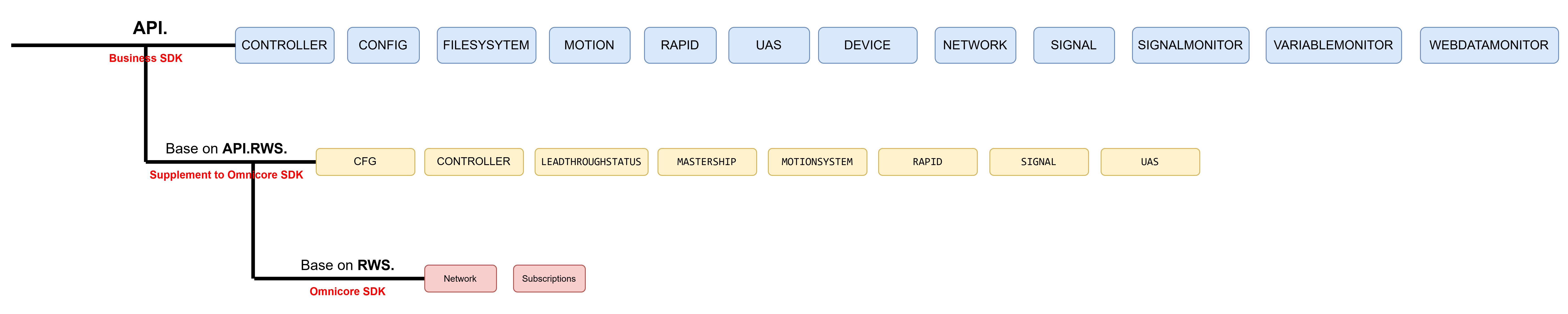
OmniCore SDK: Leverage RWS to interact with endpoints provided by the OmniCore SDK. Use RWS. to call the interfaces. A comprehensive list of supported endpoints is available in the OmniCore SDK Documentation.
RWS.Network = new function() {
  this.send = (method, path, requestHeaders = {}, body = null) => {
      return new Promise((resolve, reject) => {
          let req = new XMLHttpRequest();
          ......
      }).catch(err => Promise.reject(err));
  };
  this.get = (path, additionalRequestHeaders = {}) => {
      return this.send("GET", path, Object.assign({
          Accept: "application/hal+json;v=2.0"
      }, additionalRequestHeaders));
  };
  }();
AppStudio Extensions: AppStudio integrates certain RWS interfaces with business logic encapsulation, making them available in the API layer, which are detailed in this reference.
API.RWS:API.RWSprovides a set of RWS interfaces that are not supported by the OmniCore SDK. It is a supplement to the OmniCore SDK interfaces.API.RWS.RAPID.getModuleText = async function (moduleName, taskName = 'T_ROB1') { let res = await RWS.Network.get(`/rw/rapid/tasks/${taskName}/modules/${moduleName}/text`); var fixedResponse = res.responseText.replace(/""(.*?)""/g, '"$1"'); let obj = parseJSON(fixedResponse); if (typeof obj === 'undefined') return Promise.reject('Could not parse JSON.'); if (!obj.state[0]) return Promise.reject('Failed to get module text.'); return obj.state[0]; };API: TheAPIlayer extends the functionality of RWS by adding business logic and additional features. It provides a higher-level abstraction for developers to build applications without needing to directly interact with low-level RWS interfaces.API.RAPID.getModuleText = async function (moduleName, taskName = 'T_ROB1') { try { const res = await API.RWS.RAPID.getModuleText(moduleName, taskName); const moduleText = res['module-text']; ...... } catch (e) { API.rejectWithStatus(`Failed to get ${taskName}:${moduleName} text.`, e); } };
How to Create Unsupported RWS Interfaces
If you need to use an RWS interface that is not yet supported by the API layer or OmniCore SDK, you can perform the following steps to create a custom implementation:
Refer to the RWS Documentation: Start from reviewing the official RWS documentation to understand the URL, HTTP method (e.g., GET, POST), and request/response format of the desired interface.
Create a POST Request: Use the interface
RWS.Networkto construct a custom request. For example:RWS.Network.post( '/rw/panel/speedratio', 'speed-ratio=' + speedRatio.toString() );Create a GET Request: Use the interface
RWS.Networkto construct a custom request. For example:let speedRes = await RWS.Network.get('/rw/panel/speedratio');Test and Validate: Call the custom function to make sure it can communicate correctly with RWS and return the expected results.
TPU & Browser Environment
Typically you can run your webapp in two environments: browser environment for debugging and TPU environment for production. Please note that there might be subtle behavioral differences in the provided APIs between these two environments.
| Environment | Client Type | Typical Device |
|---|---|---|
| TPU environment | Local Client | FlexPendant (Teach Pendant) |
| Browser environment | Remote Client | Browser, RobotStudio, PC |
The navigation interface is exclusively available in the TPU environment.
Local Client Identity in Browser Environment: When opening your webapp in a web browser, if functionality relies on APIs exclusive to the Local Client (e.g., jogging), you may need to register as a Local Client using the RWS POST request 'users/register/local'. Otherwise, the system will default to treating it as a Remote Client and reject such requests. To determine if the current session is a local client login, use the API.UAS.isLoggedInAsLocalClient() interface.
The following commonly used interfaces exhibit behavioral differences between the two environments:
| API | Function | Mode | Remote Client | Local Client |
|---|---|---|---|---|
| API.RWS.MOTIONSYSTEM.setMechunit | Set active mechanical units | Auto | √ | √ |
| Manual | × | √ | ||
| API.MOTION.align API.MOTION.goToPosition | Jog functions | Auto | × | × |
| Manual | × | √ | ||
| API.RWS.requestMastership('edit') | Request edit mastership | Auto | √ | √ |
| Manual | ×(need to handle RMMP in manual mode) | √ | ||
| API.RWS.requestMastership('motion') | Request motion mastership | Auto | √ | √ |
| Manual | √ | √ | ||
| API.RAPID.startExecution | Execute RAPID program | Auto | √ | √ |
| Manual | × | √ | ||
| API.RAPID.stopExecution | Stop RAPID program | Auto | √ | √ |
| Manual | √ | √ | ||
| API.RAPID.setPPToMain API.RAPID.setPPToRoutine | Set program pointer to main / routine | Auto | √ | √ |
| Manual | × | √ | ||
| API.RWS.MOTIONSYSTEM.setLeadThroughStatus | Enable / disable leadthrough | Auto | √ | √ |
| Manual | √ | √ | ||
| API.CONTROLLER.setOpMode | Switch operation mode | Auto | × | √(witch acknowledge) |
| Manual | × | √ |